【After Effects】リンク切れ素材を再リンク|ReLinker

プロジェクト内でファイルが見つからない(リンク切れの)素材を一覧表示し、選んだフォルダ/ドライブから探して再リンクできるAfter Effects用拡張機能です
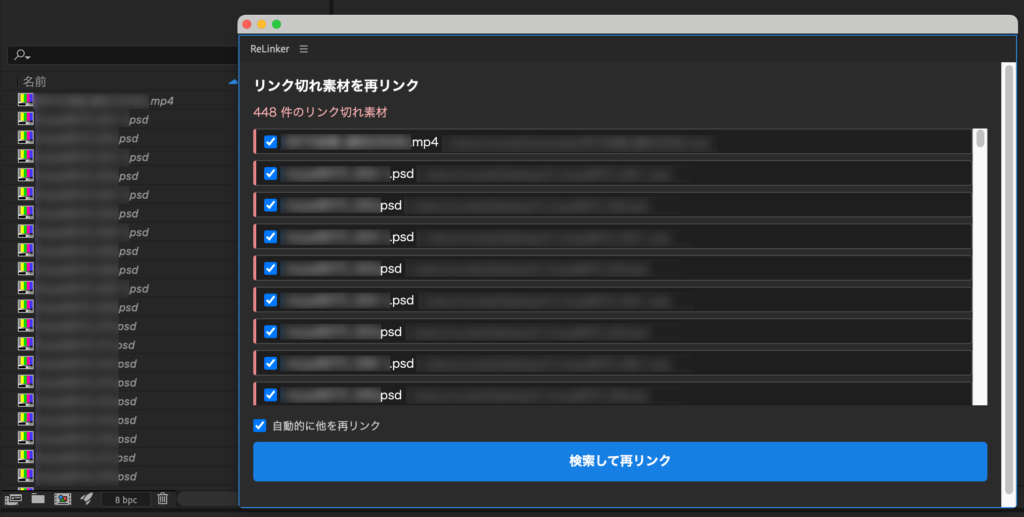
■ ReLinker とは
素材を移動・整理したあとに起こる「リンク切れ」を、まとめて探して再リンクする拡張機能です。
Premiereの「メディアをリンク」のような感覚で使えます
- プロジェクトのリンク切れ素材を一覧表示
- 検索先を選ぶと、その中を自動検索
■ 動作環境
- Adobe After Effects 2024以降で動作確認済み
PRICE(Mac版)
¥500
買い切り / 個人・商用利用問わず
Mac版:購入後、ご登録のメールアドレスにライセンスキーと .pkg インストーラーのダウンロードURLを自動送信します(数秒〜数分)。Windows版(ベータ)は下記より当面無料でダウンロードできます。
■ Windows版(ベータ・当面無料)
Windows版はベータ(動作確認版)です。動作確認のため当面無料・ライセンス認証なしでお使いいただけます(正式版は有料予定。不具合のご報告をお願いします)。下のボタンから ZXP をダウンロードし、無料の ZXP インストーラー(aescripts ZXP Installer など)で導入してください。導入後は不具合報告のお願いをしております
■ インストールとライセンス認証
- Mac版:購入後に届く .pkg をダブルクリック → After Effects 起動 → ウィンドウ → 拡張機能 → ReLinker → メールのライセンスキー(RLNK-XXXX-XXXX-XXXX)を入力して認証
- Windows版:ZXP インストーラーで ReLinker-Win-Free.zxp を導入 → After Effects 起動 → ウィンドウ → 拡張機能 → ReLinker(認証不要ですぐ使えます)
ReLinker — Relink Missing Footage in After Effects
ReLinker lists the missing (offline) footage in your project and relinks it by searching a folder or drive you choose — much like Premiere’s “Link Media”.
How to use
- List all missing footage in the project.
- Choose a search folder; ReLinker searches inside it automatically and relinks matches.
Features
- Lists all offline / missing footage at once
- Auto-searches the folder you pick and relinks
- One-time purchase (no subscription)
System requirements
- macOS (paid, license required)
- A free Windows beta is also available
- Adobe After Effects 2024 or later
Price: ¥500 (one-time purchase, personal & commercial use OK)
Get it / Download
Mac: Paid (¥500, license required). After purchase, your license key and the .pkg installer download link are emailed to you automatically (within seconds to a few minutes).
Windows (beta — free for now): The Windows version is a beta and is currently free with no license required. Download the ZXP below and install it with a free ZXP installer (e.g. aescripts ZXP Installer).
Download the Windows beta (free)
Installation & license
Mac: Double-click the .pkg → launch After Effects → Window → Extensions → ReLinker → enter the license key from the email (RLNK-XXXX-XXXX-XXXX).
Windows: Install ReLinker-Win-Free.zxp with a ZXP installer → launch After Effects → Window → Extensions → ReLinker (no license needed — ready to use).
FAQ
- Mac: install the .pkg from the email, then enter your license key (RLNK-XXXX-XXXX-XXXX).
- Windows beta is currently free and needs no license.