After Effects を再起動 → ウィンドウ → エクステンション → AnchorMover
メールに記載のライセンスキーを入力
※ Windows / Mac どちらでもお使いいただけます。
AnchorMover — Move Anchor Points to 9 Positions in One Click
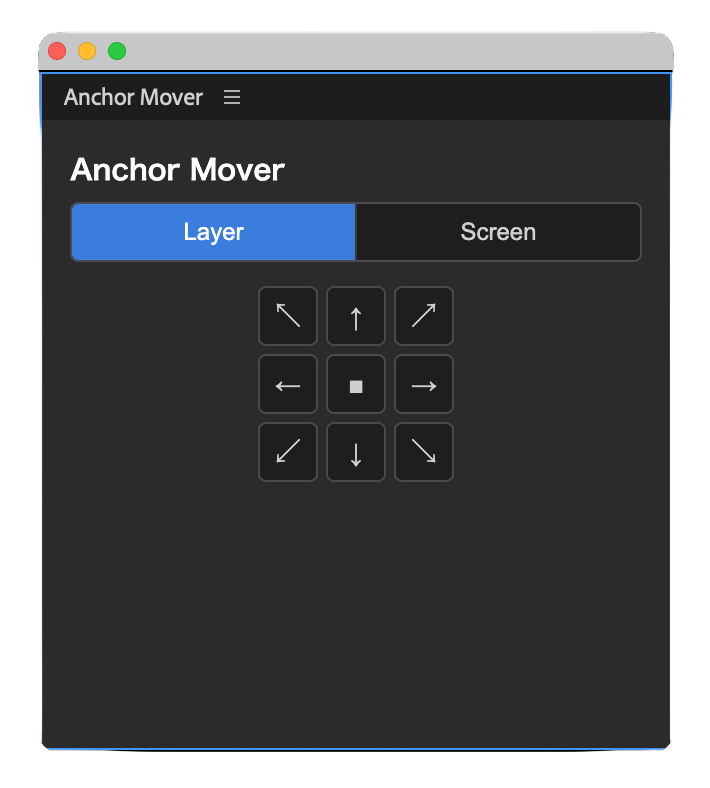
An After Effects extension that moves a selected layer’s anchor point to any of 9 positions (the four corners, four edges, and center) with a single click. The layer stays in place — its position is compensated automatically. You can process multiple layers at once.
How to use
Select one or more layers.
Choose “Layer” or “Screen” as the reference.
Click one of the 9 buttons to place the anchor point.
Features
Move the anchor point to 9 positions (corners / edges / center) in one click
Switch between “Layer” and “Screen (composition)” reference
Apply to multiple layers at once
System requirements
Windows / macOS
Adobe After Effects 2024 (24.0) or later
Price: ¥800 (one-time purchase, personal & commercial use OK)
Get it / Download
After purchase, your license key and the .zxp download link are emailed to you automatically (within seconds to a few minutes). Works on both Windows and macOS.