【Premiere】マーカーからYouTube用のチャプターを作成する拡張機能|Chapter Export

Premiere のタイムラインに打ったマーカーを、YouTube の概要欄に貼れるチャプター形式に一発で変換する Premiere Pro 用拡張機能です。タイムラインに打たれたマーカーからチャプター一覧を自動で作成します。
使い方

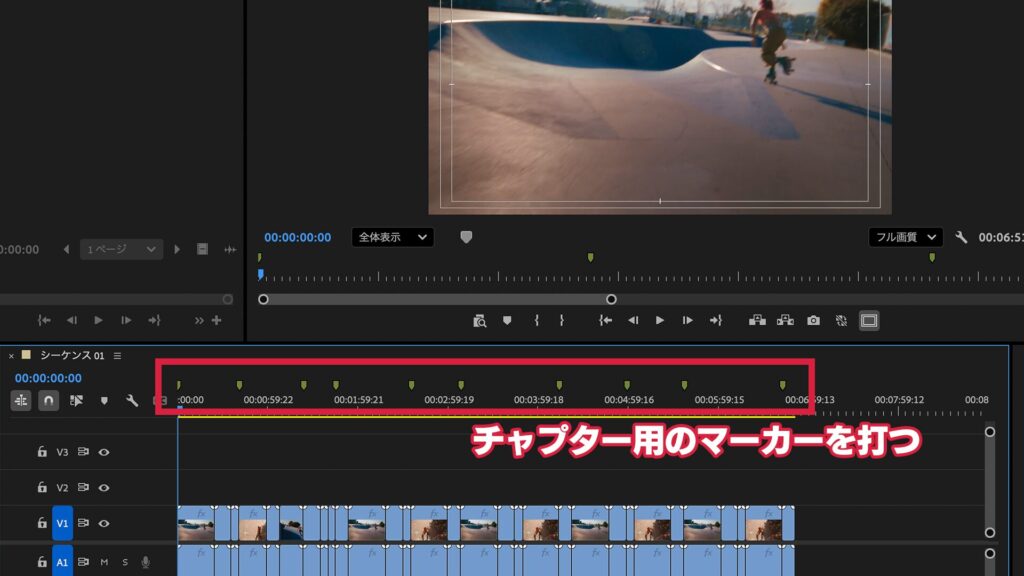
チャプターをつけたいところでタイムラインにマーカーを打ちます

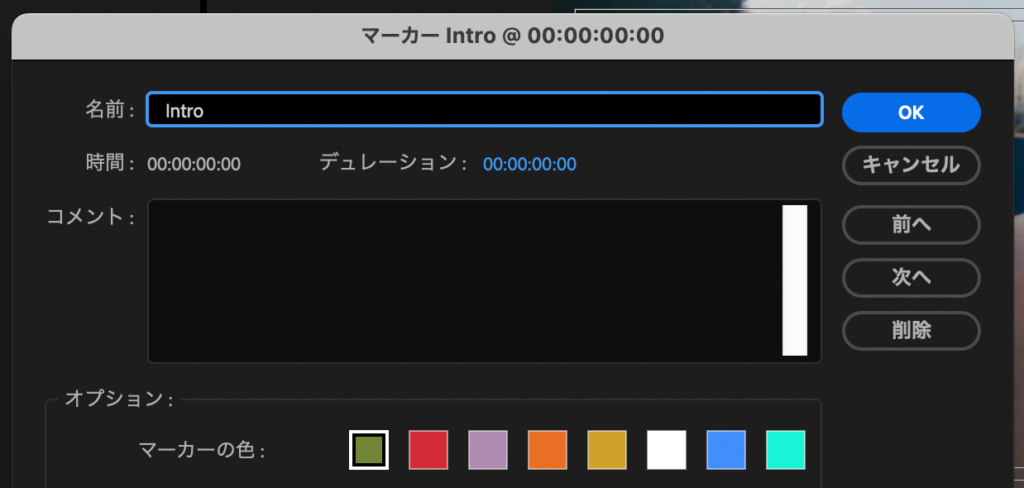
マーカーに名前をつけておけば、そのマーカー名がそのままチャプター名になります

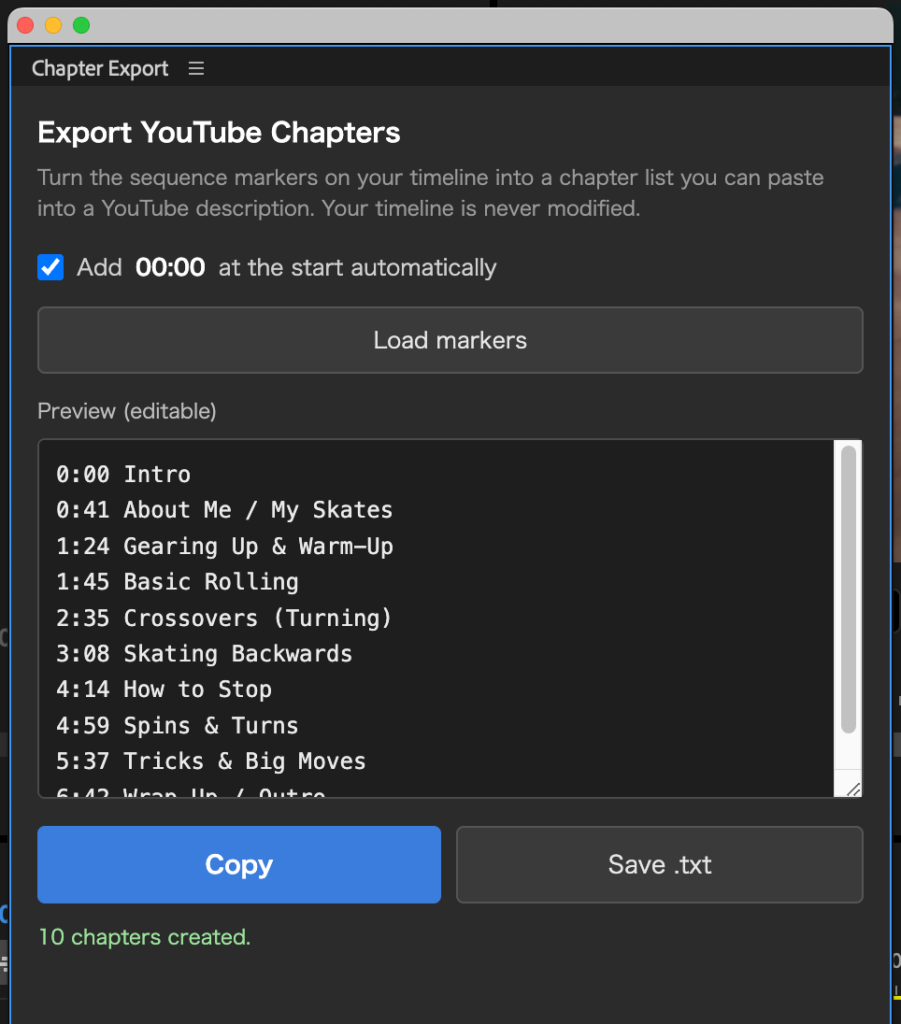
「ウィンドウ」→「エクステンション」→「Chapter Export」を実行すると
タイムラインに打ったマーカーがYouTube形式のチャプター一覧として表示されます
チャプター一覧は直接入力も可能です
チャプター名が空のマーカーは「Chapter 2」などで自動補完
「Copy」で概要欄に貼り付け、または「Save .txt」でファイル保存ができます
動作環境
Adobe Premiere Pro 2023(23.0)以降
Mac / Windows 両対応
PRICE(Mac / Windows)
¥500
買い切り / 個人・商用利用問わず
購入後、ご登録のメールアドレスにライセンスキーと、Mac版(.pkg)・Windows版(.zxp)両方のダウンロードURLを自動送信します(数秒〜数分)。1つのライセンスキーで Mac / Windows 両方ご利用いただけます。
■ インストールとライセンス認証
Mac版:購入後に届く .pkg をダブルクリック → Premiere Pro 起動 → ウインドウ → エクステンション → Chapter Export → メールのライセンスキー(CHEX-XXXX-XXXX-XXXX)を入力して認証
Windows版:ZXP インストーラーで ChapterExport-Win.zxp を導入 → Premiere Pro 起動 → ウインドウ → エクステンション → Chapter Export → メールのライセンスキー(CHEX-XXXX-XXXX-XXXX)を入力して認証
※ Windows版のインストールには「ZXPインストーラー」(無料)が別途必要です(aescripts ZXP Installer など)
Chapter Export — Turn Timeline Markers into YouTube Chapters (Premiere Pro)
Chapter Export is a Premiere Pro extension that turns the markers on your timeline into a YouTube chapter list you can paste straight into your description.
How to use
- Add sequence markers (M key) where you want chapters — the marker name becomes the chapter title.
- Click “Load markers” in the panel to build the YouTube chapter list automatically.
- Click “Copy” to paste into your description, or “Save .txt” to save a file.
Features
- Auto-converts sequence markers into YouTube chapter format (“00:00 Intro / 01:23 Main…”)
- Copy or save as .txt
- Auto-adds 00:00 and checks YouTube rules (3+ chapters, 10s+ each)
- Read-only — never changes your timeline
- One-time purchase (no subscription)
System requirements
- Adobe Premiere Pro 2023 (23.0) or later
- Mac and Windows both supported — one purchase covers both
Price: ¥500 (one-time purchase, personal & commercial use OK)
Get it / Download
Mac: Paid (¥500, license required). After purchase, your license key and the .pkg installer download link are emailed to you automatically (within seconds to a few minutes).
Buy Chapter Export (Mac & Windows) — ¥500
Windows: Your purchase also covers Windows. After buying, both the Mac (.pkg) and Windows (.zxp) download links are emailed to you.
Installation & license
Mac: Double-click the .pkg → launch Premiere Pro → Window → Extensions → Chapter Export → enter the license key from the email (CHEX-XXXX-XXXX-XXXX).
Windows: Install ChapterExport-Win.zxp with a ZXP installer → launch Premiere Pro → Window → Extensions → Chapter Export → enter the license key from the email (CHEX-XXXX-XXXX-XXXX).
Note: Installing the Windows version requires a free “ZXP installer” (e.g. aescripts ZXP Installer).
FAQ
- Chapter names come from your marker names; empty markers are auto-filled as “Chapter 2”, etc.
- Your timeline is never modified — markers are only read.
- One purchase covers both Mac and Windows (same license key).